Black & White

Change Language

Custom Html
Custom Html
PRIVATE PRE-ORDER

Stop Typing Everything. Just Speak It.

Write Anywhere. Edit With Your Voice. Record Meetings Without a Bot. Transcribe Audio & Video. Automate Everyday Work.

Meet Transcriptrr — your intelligent voice-powered writing and productivity platform.

What if you could press a hotkey, say what you're thinking, and have your words appear beautifully written right where your cursor is?

No copying. No pasting. No switching to another app.

Or simply say your own custom wake word, and Transcriptrr starts listening immediately.

Custom Html
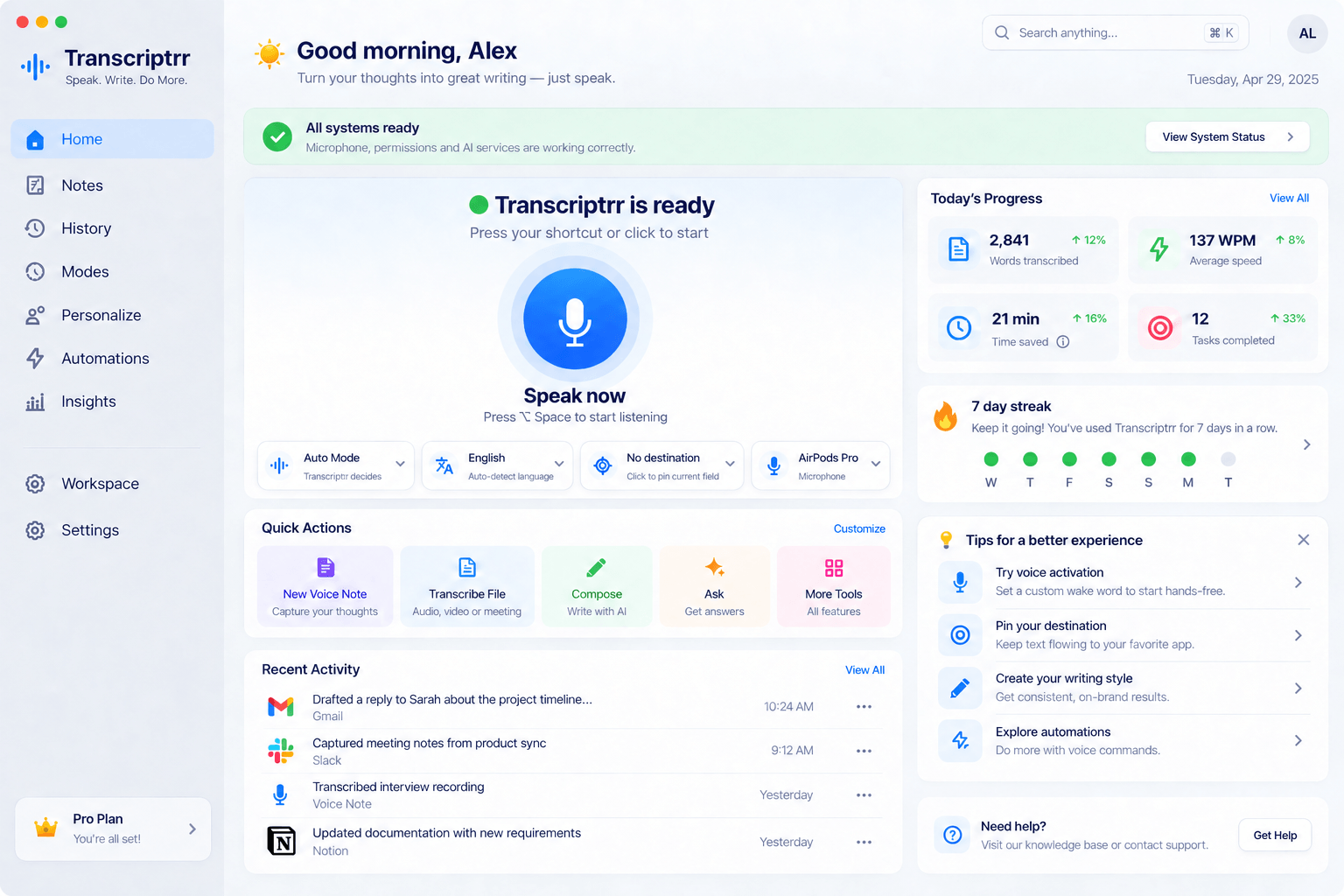
Transcriptrr macOS Home dashboard with its exact sidebar, microphone controls, progress, quick actions and activity
Listening...00:12
Pinned Destination
MGmail✓ Pinned
✓Inserted into Gmail
MGmail · Reply to SarahDraft saved

Sarah: Could you share the updated timeline?

Reply to Sarah

Hi Sarah,

I'll send the updated proposal on Friday. Thanks, and I look forward to your feedback.

Transcriptrr is readyPress ⌥ Space to start listening

Now imagine being able to do even more.

Pin a writing destination and keep dictating into it while browsing other applications.

Select any text and tell Transcriptrr to rewrite, shorten, translate, or improve it.

Say "my email" and instantly insert your complete email address.

Record meetings without a bot joining, then get speaker-labeled transcripts, summaries, and action items.

Upload audio or video files and turn recordings into searchable, editable text.

Create custom voice commands and automations that connect with the applications and workflows you use.

And when privacy matters, choose Local-Only Mode to process supported voice tasks on your device.

All from one powerful platform that works across Mac, Windows, iPhone/iPad, Android, and Web.

This isn't ordinary voice typing.

This is Transcriptrr. And it changes what you can get done with your voice.

Just speak it. Transcriptrr handles the rest.

✓ Mac release target: January 4–8, 2027✓ One pre-order, all supported devices✓ 100-day guarantee + release protection
Custom Html
How Transcriptrr Works

Getting Started Takes Just Three Steps.

Transcriptrr may be packed with powerful features, but getting started is simple. Just choose how you want to activate it, speak naturally, and use your result.

01 Set It Up

Choose How You Want to Activate It.

Set your preferred hotkey, configure a wake word, or enable hands-free dictation. Use one or use all.

Press your chosen shortcut, say your activation phrase, or use another supported control.

No complicated process. Transcriptrr is ready when you are.

Custom Hotkeys Wake Words Hands-Free
Transcriptrr Ready

Transcriptrr is ready

Your voice-writing workspace is ready.

Press fn to start listening
Hotkey Custom shortcut
Wake Word Enabled
Hands-Free Available
02 Start Speaking

Speak Naturally.

Open an app like Gmail to reply an email, pin a destination, create a Voice Note, or choose another Transcriptrr tool.

Then say what you want to write or do.

You don't have to rehearse your words or worry about perfect punctuation. Speak as you normally would, including pauses and corrections.

Transcriptrr captures your speech, understands your instructions, and prepares your writing.

Natural Speech Auto Language Pinned Destination
Transcriptrr Listening...
Listening to your voice

Auto Mode • English detected

Your Speech "Hi Sarah, um, I'll send you the updated proposal on Thursday. Actually, make that Friday. Just make it sound friendly and professional."
📌 Pinned to Gmail — Reply to Sarah
03 Get Your Result

Let Transcriptrr Handle the Result.

Your speech is processed using your chosen settings.

The result can be inserted directly into your application, prepared for review, saved, or used in an approved workflow.

Transcriptrr can clean up grammar, remove unnecessary filler words, recognize corrections, and organize your thoughts into readable text.

No copying and pasting required.

Polished Writing Direct Insertion No Copy & Paste
✓
Text successfully inserted into Gmail Transcriptrr delivered your polished reply.
✎ Compose
Inbox
Starred
Sent
Drafts
Updated proposal
S
Sarah Williams to me

Hi Alex, could you let me know when the revised proposal will be ready?

Reply to Sarah Williams

Hi Sarah,

I'll send you the updated proposal on Friday.

Thanks, and I look forward to your feedback.

Send Draft saved

That's it. You can begin with simple dictation and explore more advanced features whenever you're ready. No need to master every feature on day one.

Pre-Order Transcriptrr Now →
One pre-order · All 5 supported platforms

Your Thoughts Don't Have to Wait for Your Fingers Anymore.

Here's something you've probably experienced hundreds of times.

You know exactly what you want to say.

Maybe it's a customer reply. A business proposal. An explanation to a colleague. A new idea. Or a long message you've been putting off.

You could explain it out loud in less than a minute.

But typing it?

That's another story.

You start writing. You stop to fix something. You change a sentence. You correct a mistake. You rearrange a paragraph.

And when you finally finish, you realize how much time went into something that was already perfectly clear in your head.

Perhaps you've tried voice typing to solve this.

But ordinary dictation tools often give you a word-for-word transcript, complete with your pauses, repetitions, false starts, and awkward phrasing.

You still have to edit it.

And if you're using a separate transcription or AI writing app, there's usually another round of copying and pasting before your words reach their destination.

Transcriptrr removes much of that friction.

It combines intelligent dictation, writing assistance, application awareness, voice editing, and powerful productivity tools into one connected experience.

You speak naturally.

Transcriptrr works with your words.

And your finished text goes where you need it.

But the real difference becomes clear when you start exploring what it can do.

FEATURE 01 / 19

1. Your Favorite Hotkey. Your Own Wake Word. Your Choice of Hands-Free Controls.

Transcriptrr is ready to listen whenever you need it.

Imagine you're in the middle of writing an email.

A thought comes to mind.

Instead of reaching for the mouse, opening another tool, and clicking a microphone button, you simply press your preferred shortcut and start speaking.

That's it.

With Transcriptrr, you can activate dictation in several convenient ways.

Custom Keyboard Hotkeys

Choose the supported key or key combination you find most comfortable.

Use fn or any non-conflicted key or key combination on your Mac, configure your preferred Windows shortcut, or choose another available combination.

Press your shortcut and Transcriptrr starts listening.

You can even assign separate shortcuts to actions such as Dictate, Compose, Ask, and your favorite text transformations.

Hold-to-Talk

Hold your chosen key while speaking.

Release it when you're finished.

Perfect for quick messages, short replies, and those moments when you only need to dictate a sentence or two.

One-Touch Hands-Free Dictation

Need to dictate something longer?

Press your configured hands-free mode shortcut to start recording, speak as long as needed and press again to stop.

No need to hold a key while writing a report, developing an idea, or preparing a lengthy explanation.

Your Own Custom Wake Word

Here's a feature you'll love if you prefer working hands-free without pressing any key at all.

Set a custom activation word or short phrase.

It could be:

"Hey Transcriptrr."

"Start writing."

Or another supported phrase of your choice.

When wake-word activation is enabled, simply say your chosen phrase.

Transcriptrr recognizes it and starts the dictation session automatically.

You can immediately begin speaking, without touching your keyboard.

And because the activation phrase is a command, it doesn't get added to your finished text.

A Floating Voice Bar That Stays With You

Transcriptrr's compact floating voice bar shows when it's listening, processing, or finished.

From there, you can monitor your dictation, change modes, check your destination, and access useful controls.

There's also support for configurable mouse-button triggers, microphone selection, activation sounds, and intelligent safeguards against accidental recording.

The benefit? You spend less time figuring out how to start writing and more time actually getting things done.

Whether you prefer a keyboard, a mouse, or no hands at all, Transcriptrr adapts to you. Or set them all active and use any convenient way for each writing or action.
Custom Html
Custom Html
Listening...00:12
◉ WHAT YOU SAY Natural speech

“Um, hi Sarah, uh, just a quick update. The proposal is, it’s, it’s ready now. I’ll send the revised timeline later today—actually, no, tomorrow morning. Make that sound friendly and professional, please.”

Filler words removedCorrection understoodInstructions separated
TranscriptrrUnderstands • Polishes • Inserts
✓
WhatsAppReply to Sarah • Direct insertion
S
Sarahonline
Hey Alex, any update on the proposal?10:22
✓ Text inserted at cursor
Hi Sarah, just a quick update: the proposal is ready, and I’ll send you the revised timeline tomorrow morning.
Inserted into WhatsApp • Ready to send
ALSO WRITE DIRECTLY IN
And More...
FEATURE 02 / 19

2. Write Directly Inside Gmail, Word, WhatsApp, Google Docs, ChatGPT, and More.

No copying. No pasting. Your cursor is all you need.

This is one of the biggest differences between Transcriptrr and a typical transcription application.

Let's say you're replying to a customer in Gmail.

You click inside the message field.

Activate Transcriptrr.

Speak naturally.

Your finished message appears directly inside Gmail, at your cursor.

There's no separate transcription window you have to copy from.

No need to open ChatGPT just to fix the grammar.

No moving text back and forth between applications.

And the experience isn't limited to email.

Transcriptrr works with supported text fields in applications such as:

  • Gmail and Outlook
  • Microsoft Word and Google Docs
  • WhatsApp and Slack
  • Notion and other writing tools
  • LinkedIn and social platforms
  • ChatGPT, Claude, and supported AI applications
  • Cursor, VS Code, and other development tools
  • CRM systems, browser forms, and more

Behind the scenes, Transcriptrr uses different text-delivery methods to support the applications and fields you're working in.

And its context-aware engine can recognize the type of destination, helping it apply the appropriate writing style and behavior.

So your email can sound like an email, your chat message can sound conversational, and your AI prompt can be structured like an instruction.

You keep using the tools you're familiar with.

Transcriptrr simply makes writing inside them much easier.

FEATURE 03 / 19

3. Pin Your Destination and Keep Writing — Even While Switching Between Apps.

Meet Pinned Destination.

This is one of Transcriptrr's most powerful productivity features.

Imagine you're working on a report in Microsoft Word.

You need to review information from a website, check figures in a spreadsheet, and consult another document.

But you also want to continue dictating into that same report.

Normally, switching between applications changes where your text goes.

With Pinned Destination, you can lock a specific supported text field as your writing destination.

Now Transcriptrr remembers exactly where your words belong.

You can:

  • Keep dictating while browsing other applications.
  • Reference documents without losing your writing destination.
  • Move between tabs and windows during an active dictation.
  • See your pinned destination on the floating voice bar.
  • Switch or unpin the destination whenever you want.

And if the pinned field temporarily becomes unavailable, Transcriptrr can preserve your dictation and help recover or reconnect the destination.

Your writing destination no longer has to be the window you're currently looking at.

For writers, researchers, developers, students, analysts, and anyone who works across several applications, this is a game changer.

Instead of constantly returning to the same document, you can focus on your research while continuing to build your content.

FEATURE 04 / 19

4. Messy Speech In. Clear, Polished Writing Out.

Transcriptrr understands that people don't speak in perfect sentences.

You shouldn't have to rehearse every word before dictating.

You should be able to pause, change your mind, correct yourself, and think out loud.

That's exactly what Transcriptrr's intelligent speech processing is designed for.

It recognizes more than spoken words.

It also handles filler words, abandoned sentences, repetitions, spoken corrections, punctuation, grammar, and changes in your intended message.

For example, you say:

"Hi Sarah, um, I wanted to let you know I've reviewed the proposal. Everything looks good, but I think we should move the deadline to Wednesday. Actually, no, make that Friday because we'll need more time to finish the designs. Also tell her to send the latest price list. Make it professional but friendly."

Transcriptrr prepares:

"Hi Sarah,

I've reviewed the proposal, and everything looks good overall.

I'd suggest moving the deadline to Friday to give us more time to finish the designs.

Could you also send over the latest price list?

Thanks!"

Notice what happened.

The filler words disappeared.

The abandoned Wednesday deadline was replaced with Friday.

The message was organized into proper paragraphs.

And "make it professional but friendly" was treated as an instruction, not included in the email.

That's Transcriptrr's speech cleanup and intent-aware writing intelligence at work.

It can also automatically handle:

  • Punctuation, capitalization, and grammar.
  • False starts and repeated phrases.
  • Spoken self-corrections.
  • Sentence and paragraph structure.
  • Numbered lists and bullet points.
  • Dates, times, numbers, and currencies.
  • Email addresses, URLs, and acronyms.
  • Headings and supported rich-text formatting.

And importantly, you control how closely the result should follow your original words.

The goal isn't to change what you're saying. It's to help you communicate it more clearly.

FEATURE 05 / 19

5. Seven Writing Modes. Endless Ways to Make Your Words Sound Right.

The right writing style for every situation.

An email to your boss shouldn't sound like a message to a friend.

A technical document shouldn't read like a social media post.

And sometimes you don't want AI to rewrite your words at all.

That's why Transcriptrr includes Writing Modes.

Choose the mode that suits what you're doing.

Writing Mode What it does
Auto Uses your settings and approved context to choose suitable writing behavior
Exact Preserves your original wording with essential corrections
Polished Improves clarity, structure, and readability
Professional Prepares business-ready communication
Casual Keeps your words natural, friendly, and conversational
Concise Removes unnecessary wording while preserving meaning
Detailed Develops rough thoughts into more complete writing when requested

But here's where it gets even more powerful.

Create Your Own Custom Modes.

Want a special writing style for customer support?

Create one.

Want your emails to sound professional but warm?

Create another.

Want to dictate instructions to ChatGPT or Cursor in a particular format?

Set up a custom mode for that too.

You can configure writing instructions, examples, language, polish strength, context sources, AI models, preview behavior, and other preferences.

And with Automatic Mode Switching, Transcriptrr can activate different modes when you're using particular applications.

For example:

Professional Mode in Gmail.

Casual Mode in WhatsApp.

A custom Prompt Mode in ChatGPT.

A technical mode in your code editor.

You don't have to keep changing your writing preferences every time you switch tasks.

Transcriptrr adapts automatically to the kind of work you're doing.

FEATURE 06 / 19

6. Turn a Simple Spoken Instruction Into a Complete Email, Document, or Message.

You don't always need to dictate every word.

Sometimes you know what you want to communicate, but you don't feel like writing the entire thing.

That's where Compose comes in.

Instead of dictating a complete email word for word, you can simply say:

"Write a friendly email to James thanking him for yesterday's meeting. Tell him I enjoyed our discussion, that I'll send the updated proposal tomorrow, and that I'm looking forward to working with him."

Transcriptrr turns that instruction into a structured draft.

Or say:

"Create a LinkedIn post about three mistakes small businesses make when trying to retain customers. Keep it engaging and conversational."

You get a draft you can review and use.

The same applies to explanations, outlines, business messages, social posts, and other writing tasks.

Don't Like the First Draft? Just Speak Again.

With Voice Redraft, you can refine a generated draft using another spoken instruction.

"Make it shorter."

"Use a more confident tone."

"Keep the first paragraph but rewrite the ending."

"Add a stronger call to action."

Transcriptrr updates the proposed draft.

You can preview changes before inserting the text, so you stay in control of what actually gets written.

Instead of struggling to find the perfect words, explain what you're trying to say and let Transcriptrr help put it together.

FEATURE 07 / 19

7. Select Any Text. Tell Transcriptrr How to Improve It.

Editing no longer has to mean deleting and retyping.

You've already written something.

But now you want to make it shorter.

Or more professional.

Or easier to understand.

Maybe you want to turn a long paragraph into a list.

Normally, you'd start rewriting it manually or copy the text into another AI tool.

With Select-and-Speak Editing, you simply highlight the text and say what you want done.

"Make this more persuasive."

"Fix the grammar."

"Rewrite this for a customer."

"Summarize this into three points."

"Turn this into a checklist."

"Translate this into German."

Transcriptrr processes the selected content and prepares the revised version.

And with its Rewrite Preview and Diff Viewer, you can compare the original against the proposed changes before accepting them.

Need another version?

Ask Transcriptrr to try again.

Want to keep the original?

Cancel the change.

You can also create reusable Custom Transforms for editing tasks you perform regularly.

Imagine saving your preferred customer support rewrite, marketing copy improvement, or technical explanation format as a reusable action.

A task that previously involved several rounds of manual editing can begin with one spoken instruction.

FEATURE 08 / 19

8. Say "My Email" Instead of Spelling Your Full Email Address Every Time.

Text Replacements and Voice Snippets that save you from repeating yourself.

This might be one of the most practical features you'll use every day.

Think about the information you type repeatedly.

Your email address.

Website address.

Business details.

Booking link.

Email signature.

Customer support greeting.

Standard replies.

With Transcriptrr, you can save that information and assign short spoken phrases to it.

For example:

What you say What Transcriptrr inserts
"My email" hello@mybusiness.com
"My website" https://www.mybusiness.com
"My booking link" Your complete saved booking URL
"My signature" Your full name, title, email, and contact details
"Welcome reply" Your saved customer welcome message
"Support response" Your frequently used support reply

You configure the phrases and their replacements.

And you're not limited to single lines.

Transcriptrr's Voice Snippets can insert multi-paragraph responses, links, lists, signatures, and other reusable content.

You can organize snippets into folders and quickly access your favorites.

For business owners, customer support teams, marketers, and anyone who frequently types the same information, this can eliminate a surprising amount of repetitive work.

Why say twenty words when two can insert the exact information you need?

FEATURE 09 / 19

9. Transcriptrr Learns Your Vocabulary, Pronunciations, and Personal Writing Style.

Make your voice assistant familiar with the words you use.

Every business and profession has its own language.

Company names.

Product names.

Technical terms.

Acronyms.

Unusual names.

And expressions that ordinary speech-recognition systems don't always get right.

Transcriptrr includes a Personal Dictionary to handle these situations.

Add important terms and specify how they should appear.

Create pronunciation mappings.

Save preferred spellings and replacements.

Import large vocabulary lists from supported files.

And use correction-learning features to help personalize future results.

You can also configure your Personal Writing Style.

Maybe you prefer short paragraphs.

Maybe you dislike overly formal language.

Maybe you always want American English spelling.

Maybe you have a specific way of greeting customers.

Transcriptrr can apply your configured preferences instead of forcing every piece of writing into the same generic style.

The more you customize it, the more your writing experience can reflect the way you actually communicate.

FEATURE 10 / 19

10. Record Meetings Without a Bot Joining Your Call.

Meet Transcriptrr's Bot-Free Meeting Intelligence.

We've all been in meetings where someone had to divide their attention between listening and taking notes.

A deadline gets mentioned.

A decision gets made.

Someone promises to follow up.

And by the time the meeting ends, you're trying to remember what was said, who said it, and what happens next.

Meeting transcription can solve that problem.

But many meeting tools require a bot to join the meeting as another participant.

Transcriptrr doesn't need to do that.

With bot-free capture, Transcriptrr can record supported meetings through permitted device audio pathways after you authorize the recording.

No additional recording bot appearing in the participant list.

You can focus on the conversation while Transcriptrr captures the discussion.

And that's where its meeting intelligence begins.

Speaker Identification — Know Who Said What.

Transcriptrr uses speaker separation and available contextual information to help identify and label different speakers.

Instead of reading one continuous wall of text, you can see the conversation divided by speaker.

Names and speaker assignments can be reviewed and corrected where needed.

Full Meeting Transcripts

Get a searchable written record of the conversation, with speaker-labeled sections and available playback controls.

Intelligent Meeting Summaries

Instead of reading through an hour-long transcript, get a structured overview of the main points, topics, discussions, and conclusions.

Decisions and Action Items

Find the important decisions, tasks, responsibilities, and next steps discussed in the meeting.

Ask Questions About the Meeting

Need to remember what was said about a deadline?

Ask Transcriptrr.

Want to know which tasks were assigned?

Ask.

You can work with the captured transcript instead of manually hunting through the recording.

Meeting Search and History

Search and revisit previous meetings to find relevant information.

Calendar-Aware Meeting Assistance

Connect supported calendars to receive meeting reminders and prepare relevant pre-meeting information.

Already Have a Recorded Meeting? Upload It.

Here's another powerful option.

You don't have to record every meeting live with Transcriptrr.

Upload a supported audio or video recording of an existing meeting.

Transcriptrr can process it into a transcript, separate speakers, prepare speaker details, generate summaries, and extract useful action items.

Whether you attend meetings every day or only occasionally, this turns conversations into information you can actually work with.

Less frantic note-taking. Better records. Clearer follow-ups.

FEATURE 11 / 19

11. Upload Audio and Video Files. Turn Recordings Into Text, Summaries, and More.

Your recordings contain valuable information. Transcriptrr helps unlock it.

Maybe you recorded an interview.

A lecture.

A podcast.

A webinar.

A customer conversation.

Or a video containing information you want to use.

Instead of listening to the recording over and over while manually typing notes, simply upload it to Transcriptrr.

Its Audio and Video Transcription capabilities convert supported recordings into text you can read, search, edit, organize, and reuse.

And there's more.

Batch Transcription

Have several recordings?

Process multiple supported files together instead of uploading them one at a time.

Media URL Transcription

Import recordings from supported online media URLs.

Multi-Track Transcription

Working with podcast recordings or separately captured speakers?

Transcriptrr supports multi-track workflows to help combine and align transcription results.

Subtitle Generation

Create SRT and VTT subtitle files for eligible recordings.

Translation and Text Transformations

Translate supported transcripts or turn them into summaries, notes, action items, and other useful formats.

Export Options

Export eligible transcripts into supported text, document, structured-data, and subtitle formats.

This makes Transcriptrr useful for content creators, podcasters, educators, journalists, researchers, marketers, and businesses working with recorded information.

One recording can become a searchable transcript, a summary, subtitles, and the foundation for new content.

FEATURE 12 / 19

12. Capture Ideas With Voice Notes. Organize Them Into Something Useful.

Because your best ideas don't always arrive when you're ready to type.

Sometimes an idea comes to you unexpectedly.

You're researching something.

Working on another project.

Or simply thinking through a problem.

By the time you open a document and start writing, half the idea may already be gone.

Transcriptrr's Voice Notes makes capturing those thoughts easier.

Start a new note and speak.

Your words are captured and converted into text.

Then organize the note using folders, tags, and pinning.

Search previous notes.

Append more recording to an existing note.

Merge related notes into a more organized document.

And use the writing tools to improve structure, expand ideas, or transform the content.

Speak-First Notes

Prefer to begin talking immediately?

Configure new Voice Notes to start recording automatically.

Always-on-Top Notes

Need to reference something while working in another app?

Keep an eligible note visible above other windows.

Notes, Files, and Meetings in One Workspace

Your dictated notes, imported recordings, and meeting information are accessible through Transcriptrr's organized workspace.

You don't have to know exactly what an idea will become before capturing it.

Speak it now. Organize and develop it later.

FEATURE 13 / 19

13. Work Privately With Local-Only Processing — Or Choose Your Preferred AI Provider.

More control over your voice, your models, and your data.

Not every task needs the same processing setup.

Sometimes you want maximum convenience.

Sometimes you want a particular AI model.

And sometimes you want your content to stay on your own device.

Transcriptrr gives you those choices.

Local-Only Mode

Run supported speech and language processing locally using compatible device hardware and installed models.

Instead of sending eligible content to a cloud processor, the work can happen on your device.

This can be particularly valuable for private notes, confidential business information, and privacy-sensitive workflows.

Cloud Processing

Prefer cloud-based speech recognition or AI models?

Use supported cloud processing options for the capabilities and languages available through those providers.

AI Provider and Model Selection

Choose supported speech-to-text and language models according to your preferences for performance, accuracy, languages, and control.

Bring Your Own Key

Already have access to a supported provider?

Use BYOK — Bring Your Own Key to connect your own API credentials.

Local Model Library

Browse, install, and manage compatible local models.

Privacy and Retention Controls

Transcriptrr also gives you control over how your information is handled through:

  • Privacy Mode.
  • Never-Save Mode.
  • Sensitive app and website exclusions.
  • Per-app privacy settings.
  • Context-awareness controls.
  • Separate retention options for recordings and text.
  • Secure-field protection.
  • Data deletion controls.

You decide what context Transcriptrr may use and which processing options are appropriate for your work.

The result is a flexible voice platform that can be configured for convenience, privacy, or more advanced processing needs.

FEATURE 14 / 19

14. Turn Your Voice Into Commands, Actions, and Automations.

Why stop at writing when you can use your voice to get things done?

Imagine you're working on a document and need to perform an action.

Instead of stopping to find a menu or manually executing the same series of steps, you give Transcriptrr a spoken instruction.

"Make this paragraph shorter."

"Insert my saved signature."

"Open my project dashboard."

"Search the web for this topic."

"Run my follow-up workflow."

Transcriptrr's Voice Commands can handle supported writing, editing, application, and workflow actions.

And with Custom Commands, you can configure specific phrases that trigger your preferred actions.

But Transcriptrr's automation capabilities go further.

Zapier, Make, and n8n Integrations

Connect Transcriptrr to supported automation services to create workflows involving your other applications.

Webhooks

Send approved events and information to configured external services.

Apple Shortcuts

Use supported device actions and shortcuts to activate Transcriptrr workflows.

Custom Actions and Workflows

Define what should happen when particular commands or events occur.

Developer APIs, SDKs, CLI, and MCP

Build more advanced voice-powered integrations and connect Transcriptrr with compatible developer tools and AI-agent workflows.

For example, a completed recording could trigger a configured processing workflow.

A transcript could be passed to another application.

A spoken command could initiate an approved series of actions.

Transcriptrr gives you a way to connect what you say to what your software does.

And instead of manually repeating the same workflow, you can simply tell it to begin.

FEATURE 15 / 19

15. Make ChatGPT, Claude, Cursor, and Other AI Tools Easier to Work With.

Better prompts, without typing long instructions.

If you use AI tools regularly, you know how important good instructions can be.

But describing a complicated task often means typing several paragraphs.

What you want done.

Why you're doing it.

The details.

The constraints.

The output format.

And everything you don't want the AI to miss.

With AI Prompt Intelligence, Transcriptrr helps turn naturally spoken instructions into clearer, structured prompts.

You can explain the task out loud without carefully typing every sentence.

Transcriptrr helps organize the instruction while preserving your requirements.

For developers, Developer Mode offers additional support for technical vocabulary, code identifiers, programming symbols, filenames, and editor-aware context.

You can also create custom modes for specific AI tools and coding workflows.

It's a more natural way to communicate complex ideas to the AI tools you already use.

FEATURE 16 / 19

16. Speak One Language. Write in Another. 100s of Supported Languages.

Communicate across languages without juggling multiple tools.

Transcriptrr supports multilingual dictation and translation.

It can automatically detect supported spoken languages and prepare text in the same language.

Or you can choose a different output language.

For example:

Speak in English, write in French.

Speak in Spanish, write in English.

Speak in one language but tell Transcriptrr to write in another language all within the speech and get a well structured written text in the desired language.

Dictate a message, then translate the selected text into another supported language.

You can also save favorite output languages and configure regional writing preferences.

Transcriptrr supports appropriate formatting of dates, numbers, punctuation, and other language-dependent details.

For international businesses, multilingual professionals, students, and global teams, this makes cross-language communication more convenient.

Your preferred speaking language doesn't have to limit the language you write in.

FEATURE 17 / 19

17. Mac, Windows, iPhone, Android, and Web — Your Voice Works Across Your Devices.

Your workflow doesn't end when you leave your desk.

You might begin your day working on your Mac.

Continue on a Windows computer.

Respond to messages from your iPhone.

And later use your Android device or browser.

Transcriptrr is available across all these platforms.

macOS

System-wide voice writing, customizable shortcuts, floating controls, Pinned Destination, and the Transcriptrr desktop workspace.

Windows

Desktop dictation, application-aware text insertion, configurable shortcuts, and supported productivity features.

iPhone and iPad

Voice writing through the Transcriptrr keyboard and eligible integrations with the Action Button, Control Center, and Apple Shortcuts.

Android

Voice dictation through the supported keyboard and available floating voice controls.

Web and Browser Extension

Access Transcriptrr through the browser and use enhanced integrations for compatible websites and text fields.

Cross-Device Synchronization

Sync eligible writing modes, dictionary entries, snippets, and preferences across your devices.

You can also continue supported unfinished drafts across devices.

Your writing experience can stay familiar even when your device changes.

FEATURE 18 / 19

18. Your Words Are Protected Against More Than Just Typos.

Recovery, History, and intelligent fallbacks.

Imagine dictating a detailed report for several minutes.

Then something goes wrong.

You had to leave abruptly.

The last thing you want is to start speaking all over again.

Transcriptrr includes a Persistent Dictation Buffer to help preserve captured work independently of the destination application.

It also provides:

Paste Last: Quickly reinsert your most recent completed dictation.

Copy Last: Recover your latest result to the clipboard.

History: Search and revisit previous sessions according to your storage settings.

Raw and Polished Versions: Review eligible original and processed transcripts.

Reprocess: Run retained content through another supported mode or model.

Failed Insertion Recovery: Retry delivery, copy the result, or choose another destination.

Provider Failover: Use an appropriate configured fallback when a processing provider fails.

Clipboard Preservation: Restore your previous clipboard content when temporary clipboard insertion is used.

These features may not be the first things you notice in a demo.

But once you rely on voice writing every day, they matter.

Because the words you've already spoken shouldn't disappear just because your device had a problem.

FEATURE 19 / 19

19. Built for Individuals. Powerful Enough for Teams.

One voice platform that can grow with your work.

Transcriptrr isn't limited to personal use.

With Workspaces, teams and organizations can manage a shared voice-powered writing environment.

Invite team members.

Assign roles and permissions.

Share company terminology through common dictionaries.

Create approved snippets and standard responses.

Define company writing styles.

Manage billing and seats.

And configure more advanced security and administration settings.

For larger organizations, Transcriptrr includes enterprise capabilities such as supported identity management, centralized policies, deployment controls, and audit logs.

See How You're Using Transcriptrr.

The Insights dashboard helps you understand your voice-writing activity.

Track eligible metrics such as:

  • Total words dictated.
  • Estimated time saved.
  • Average voice-writing speed.
  • Usage across applications.
  • Activity trends.
  • Team adoption and relevant organizational metrics.

Whether you're working alone, managing a business, or supporting a larger team, Transcriptrr gives you tools that extend beyond ordinary dictation.

Everything Works Together. That's What Makes Transcriptrr Different.

Think about what you'd normally need to handle all these tasks.

A speech-to-text application.

An AI writing assistant.

A grammar and rewriting tool.

A text expander.

A voice-note application.

A meeting transcription service.

An audio/video transcription tool.

A workflow automation service.

And perhaps other tools for translation, subtitles, and AI prompts.

Transcriptrr brings these capabilities together in one connected platform.

Feature What it means for you
Custom Hotkeys & Wake Words Start listening immediately, your way
Direct Cursor Insertion Write inside your existing applications without copying and pasting
Pinned Destination Continue dictating into a selected field while working elsewhere
Intelligent Speech Cleanup Get clearer writing from natural, imperfect speech
Writing Modes Match the tone and structure to the task
Compose & Voice Redraft Generate and refine drafts by speaking
Select-and-Speak Editing Improve existing text without manually rewriting it
Text Replacements & Snippets Insert frequently used information with short phrases
Personal Dictionary Improve recognition of your names, terminology, and preferences
Bot-Free Meeting Capture Record supported meetings without adding a bot participant
Speaker Identification & Meeting AI Get labeled transcripts, summaries, decisions, and action items
Audio/Video File Transcription Turn existing recordings into searchable, reusable text
Voice Notes Capture and organize ideas as they happen
Local-Only Processing Keep supported processing on your device when desired
Automations & Integrations Turn spoken commands into configured actions and workflows
AI Prompt Intelligence Prepare clearer prompts for your AI tools
Multilingual Writing Speak and produce text in supported languages
Cross-Platform Support Work across Mac, Windows, iOS, Android, and Web
History & Recovery Retrieve previous writing and recover interrupted sessions
Team Workspaces & Insights Manage shared resources and understand usage

Of course, you don't have to use every feature.

You might start with simple dictation.

Then discover how useful Pinned Destination can be.

Then begin using snippets.

Then Voice Notes.

Then meeting intelligence.

And eventually, custom actions and automations.

Transcriptrr can be as simple as a voice-powered keyboard or as powerful as a connected productivity workspace.

You decide how far you want to take it.

See How Much Transcriptrr Can Change an Ordinary Workday.

Imagine starting your morning with a full inbox.

You open Gmail and press your custom hotkey.

You speak a reply.

Transcriptrr cleans up the wording and inserts the finished message directly into your email.

A customer asks for your contact information.

You say "my contact details," and your saved information appears.

Next, you need to finish a report.

You pin the document as your destination.

Then you switch to your browser to gather more information while continuing to dictate into the report.

A paragraph sounds too long.

You select it and say, "Make this shorter and clearer."

Transcriptrr prepares a new version.

Later, you join a meeting.

You approve bot-free recording and concentrate on the discussion.

Afterward, you review the transcript, speaker details, summary, and action items.

Someone sends you a recorded presentation.

You upload it and turn it into a transcript you can search and reuse.

An idea comes to you for another project.

You create a Voice Note and talk through it.

Then you trigger one of your configured workflows with a spoken command.

And when you're away from your desk, you can continue supported work from your phone.

Same workday. Same tasks. A much easier way to handle so many of them.

That's the value of having these capabilities together.

Custom Html

Who Is Transcriptrr For?

Business Owners and Entrepreneurs

Prepare emails, proposals, customer replies, and business documents. Capture ideas, record meetings, use reusable text snippets, and automate routine work.

Writers, Authors, and Content Creators

Dictate drafts, improve paragraphs, capture ideas in Voice Notes, transcribe recordings, and repurpose existing content.

Professionals and Remote Workers

Handle emails, documents, meetings, and everyday communication more conveniently across applications.

Marketers and Sales Professionals

Write outreach messages, social posts, proposals, and follow-ups. Use writing modes, reusable snippets, and connected workflows.

Developers and AI Power Users

Dictate detailed prompts, work with technical vocabulary, configure AI models, and use developer-oriented integrations and commands.

Students, Researchers, and Educators

Capture notes, transcribe interviews and lectures, organize information, and turn recordings into searchable material.

Customer Support and Operations Teams

Use approved responses, company dictionaries, team writing styles, and automation to handle recurring communication tasks.

Anyone Who Wants to Type Less

You don't have to be a professional writer or an AI expert.

If you regularly type emails, messages, notes, documents, or instructions, Transcriptrr gives you another way to get them done.


Custom Html
How Transcriptrr Works

Getting Started Takes Just Three Steps.

Transcriptrr may be packed with powerful features, but getting started is simple. Just choose how you want to activate it, speak naturally, and use your result.

01 Set It Up

Choose How You Want to Activate It.

Set your preferred hotkey, configure a wake word, or enable hands-free dictation.

Press your chosen shortcut, say your activation phrase, or use another supported control.

No complicated process. Transcriptrr is ready when you are.

Custom Hotkeys Wake Words Hands-Free
Transcriptrr Ready

Transcriptrr is ready

Your voice-writing workspace is ready.

Press fn to start listening
Hotkey Custom shortcut
Wake Word Enabled
Hands-Free Available
02 Start Speaking

Speak Naturally.

Open an app like Gmail to reply an email, pin a destination, create a Voice Note, or choose another Transcriptrr tool.

Then say what you want to write or do.

You don't have to rehearse your words or worry about perfect punctuation. Speak as you normally would, including pauses and corrections.

Transcriptrr captures your speech, understands your instructions, and prepares your writing.

Natural Speech Auto Language Pinned Destination
Transcriptrr Listening...
Listening to your voice

Auto Mode • English detected

Your Speech "Hi Sarah, um, I'll send you the updated proposal on Thursday. Actually, make that Friday. Just make it sound friendly and professional."
📌 Pinned to Gmail — Reply to Sarah
03 Get Your Result

Let Transcriptrr Handle the Result.

Your speech is processed using your chosen settings.

The result can be inserted directly into your application, prepared for review, saved, or used in an approved workflow.

Transcriptrr can clean up grammar, remove unnecessary filler words, recognize corrections, and organize your thoughts into readable text.

No copying and pasting required.

Polished Writing Direct Insertion No Copy & Paste
✓
Text successfully inserted into Gmail Transcriptrr delivered your polished reply.
✎ Compose
Inbox
Starred
Sent
Drafts
Updated proposal
S
Sarah Williams to me

Hi Alex, could you let me know when the revised proposal will be ready?

Reply to Sarah Williams

Hi Sarah,

I'll send you the updated proposal on Friday.

Thanks, and I look forward to your feedback.

Send Draft saved

That's it. You can begin with simple dictation and explore more advanced features whenever you're ready. No need to master every feature on day one.

Pre-Order Transcriptrr Now →
One pre-order · All 5 supported platforms

You Don't Need Another Tool That Adds More Work to Your Day.  No!

You need something that makes the tools you're already using easier to work with.

That's what Transcriptrr is designed to do.

It brings your voice directly into your writing workflow.

It remembers your preferences.

It helps clean up and organize your words.

It gives you shortcuts for things you do repeatedly.

It provides powerful ways to work with meetings, recordings, and notes.

And it connects your voice to actions and automation when you need more.

This isn't about replacing the way you think or work.

It's about giving you a more natural way to express ideas, communicate, capture information, and get things done.

YOUR PRE-ORDER · WHAT HAPPENS NEXT

Pre-Order Now.  Your Access Begins 60 Days from This Week, With 100 Days Money Back Guarantee.

Transcriptrr is currently in testing. We're preparing the first customer release for Mac, followed by Windows, iOS, Android, and Web.

01Right now

Pre-order & final testing

Reserve your Transcriptrr access while we complete testing and refine the product for customers.

02JANUARY 4–8, 2027 · target

First macOS release

We plan to start delivering Mac access during the first week of January, within 60 days from this week, with setup instructions sent to eligible pre-order buyers.

03Following weeks

All other supported platforms

Windows, iOS, Android, and Web follow progressively. We'll send updates and access instructions as each becomes available.

✓

One Pre-Order. All Supported Devices.

Your pre-order guarantees access to the Mac, Windows, iOS, Android, and Web releases included in this offer. You won't have to buy again just because another device version launches later. The full feature set has been built and is undergoing testing; access is delivered progressively by platform.

Everything You Need to Put Your Voice to Work. Choose Transcriptrr Today!

Custom Html
YOUR EXCLUSIVE PRE-ORDER PACKAGE

One Simple Payment.
Everything You Need.

Get the power to write, communicate, capture meetings, automate tasks, and work faster using your voice. One pre-order unlocks your complete Transcriptrr package.

COMPLETE TRANSCRIPTRR PRE-ORDER ACCESS

One Package. All Features.

$147
ONE-TIME PAYMENT

Pay once to secure your complete pre-order package.
No recurring subscription for this purchase.

One Pre-Order. All 5 Platforms.
macOS • Windows • iOS • Android • Web
Access every included platform as released.
Here's What Your $147 Unlocks:
✓ Write anywhere with your voice — turn speech into polished text inside your favorite applications.
✓ Compose, rewrite and edit with AI — get better writing without typing.
✓ Capture meetings without bots — get transcripts, summaries, decisions and action items.
✓ Control your workflow by voice — use hotkeys, wake words, commands and automations.
✓ Stay productive across devices — access Transcriptrr across all five supported platforms as released.
View All Features & Benefits

Explore everything included in your Transcriptrr pre-order and discover how each feature helps you work smarter and save time.

Voice Dictation & Writing
1. Custom Hotkeys & Wake Words
Start listening immediately, your way.
2. Direct Cursor Insertion
Write inside your existing applications without copying and pasting.
3. Pinned Destination
Continue dictating into a selected field while working elsewhere.
4. Intelligent Speech Cleanup
Get clearer writing from natural, imperfect speech.
5. Writing Modes
Match the tone and structure to the task.
6. Compose & Voice Redraft
Generate and refine drafts by speaking.
7. Select-and-Speak Editing
Improve existing text without manually rewriting it.
8. Text Replacements & Snippets
Insert frequently used information with short phrases.
9. Personal Dictionary
Improve recognition of your names, terminology, and preferences.
Meetings, Recordings & Notes
10. Bot-Free Meeting Capture
Record supported meetings without adding a bot participant.
11. Speaker Identification & Meeting AI
Get labeled transcripts, summaries, decisions, and action items.
12. Audio/Video File Transcription
Turn existing recordings into searchable, reusable text.
13. Voice Notes
Capture and organize ideas as they happen.
Intelligence, Automation & Privacy
14. Local-Only Processing
Keep supported processing on your device when desired.
15. Automations & Integrations
Turn spoken commands into configured actions and workflows.
16. AI Prompt Intelligence
Prepare clearer prompts for your AI tools.
17. Multilingual Writing
Speak and produce text in supported languages.
Platforms, History & Workspaces
18. Cross-Platform Support
Work across Mac, Windows, iOS, Android, and Web.
19. History & Recovery
Retrieve previous writing and recover interrupted sessions.
20. Team Workspaces & Insights
Manage shared resources and understand usage.
All Features. One Pre-Order.
Just $147
One-time payment
Custom Html
03 Days
16 Hrs
34 Mins
55 Secs
077 Ms
Pre-order offer ends Friday, Nov 6 at 11:59 PM EST
Pre-Order Transcriptrr Now →
One-time payment • Complete pre-order package
✓ 100-Day Money-Back Guarantee

Your pre-order is protected by our 100-day money-back guarantee. If a technical issue cannot be resolved, then we will refund every penny. 100 days covers from this week of purchase up to 40 days after Transcriptrr release. That gives you more than one month to use Transcriptrr and decide for yourself.

How you'll get access:
macOS is targeted for release in the first week of January 2027, with Windows, iOS, Android and Web following. Your pre-order secures access to all five platforms as they become available.
100DAY
YOUR PURCHASE IS PROTECTED

Pre-Order With Confidence. You're Covered by Our 100-Day Money-Back Guarantee.

Because this is a pre-order, we want you to have the time to actually use Transcriptrr—not just spend your refund period waiting for a release.

100 days from today — with release protection.

Your 100-day guarantee starts on the day you pre-order. If a platform release is delayed, we'll extend your protection so you still have at least 40 days after you receive access to use and assess it.

If we can't fix a technical issue, you get every penny back.

Report any technical issue during your applicable guarantee period and let our support team try to resolve it. If we're unable to fix it, we'll refund 100% of your Transcriptrr purchase price and absorb the cost of the Transcriptrr-provided usage you've already consumed.

Frequently Asked Questions

Can I use any keyboard shortcut to activate Transcriptrr?+

You can configure your preferred supported keyboard shortcuts for dictation and other actions. Transcriptrr also includes hold-to-talk, hands-free shortcuts, and optional custom wake-word activation.

Does Transcriptrr really insert text directly where my cursor is?+

Yes, in supported editable fields. You can dictate directly inside compatible applications and websites without manually copying and pasting the result.

What is Pinned Destination?+

Pinned Destination lets you lock a particular supported text field as your writing destination. This allows you to continue dictating into that location while switching between applications and windows.

What if I don't speak in perfect sentences?+

That's fine. Transcriptrr is designed to recognize natural speech, clean up fillers and repetitions, correct obvious mistakes, and organize the text according to your selected mode.

Can I use my own writing styles?+

Yes. Transcriptrr includes predefined writing modes and customizable profiles. You can configure tone, polishing strength, context, language, and other writing preferences.

Can Transcriptrr write an email from spoken instructions?+

Yes. Compose lets you explain the message you want written. You can then review or refine the result with additional spoken instructions.

Can I edit text I've already written?+

Yes. Select eligible text and tell Transcriptrr to rewrite, shorten, expand, translate, proofread, or reformat it.

Can I insert my email address or saved messages with short voice phrases?+

Yes. Text Replacements and Voice Snippets let you save commonly used content and insert it through configured spoken triggers.

Can Transcriptrr record meetings without joining as a bot?+

Yes. It supports bot-free capture through permitted device or application audio pathways, subject to the necessary permissions and recording consent.

Can it identify speakers during meetings?+

Transcriptrr includes speaker separation and context-aware labeling to help identify different speakers. You can review and correct speaker labels as needed.

Can I upload previously recorded meetings?+

Yes. Upload supported meeting recordings to generate transcripts, speaker details, summaries, and other meeting information.

Can I transcribe audio and video files?+

Yes. Transcriptrr supports compatible audio and video transcription, including batch processing, selected media URLs, multi-track workflows, and subtitle exports.

Can I use Transcriptrr locally without cloud processing?+

Yes, for supported workflows using compatible on-device models and hardware. Certain integrations and cloud services still require internet access.

Does it support automation and integrations?+

Yes. Transcriptrr supports configurable voice actions and workflows through compatible services, including Zapier, Make, n8n, webhooks, Apple Shortcuts, and developer interfaces.

Can I connect my own AI provider?+

Yes. Advanced settings include supported provider and model selection, Bring Your Own Key, and local-model options.

Does Transcriptrr work on Mac, Windows, iOS, Android, and Web?+

Yes. Transcriptrr supports all five platforms, with capabilities adapted to the relevant operating system and application permissions.

What if something goes wrong during dictation?+

Transcriptrr includes a persistent buffer, history, copy/paste recovery, and insertion retry mechanisms to help preserve or recover captured work.

Is Transcriptrr suitable for non-technical users?+

Absolutely. You can begin with a shortcut and simple voice dictation. The advanced features are there when you want them, but they're not required to get started.

Is Transcriptrr available immediately?+

Transcriptrr is currently in testing. You can pre-order now, and you will receive access instructions as your supported platform release becomes available.

When will the Mac version be released?+

Our current target is the first week of January 2027 (January 4–8). This is a planned release window and could change if additional testing or fixes are needed.

What about Windows, iPhone, Android and Web?+

We plan to release the other supported versions progressively in the following weeks. Your pre-order includes access to all these device releases under your purchased offer.

What if a release is delayed?+

Your 100-day guarantee begins on your purchase date, but its deadline extends when needed so you have at least 40 days to use the release for your chosen platform after access is provided.

How does the technical money-back guarantee work?+

If you report a technical problem during the applicable guarantee period and our support team cannot resolve it, we will refund every penny you paid us for Transcriptrr, with no deduction for the Transcriptrr usage you have consumed. Services you separately pay third parties for through your own API keys are outside that refund.

Your Voice Is Ready. Put It to Work.

You've been speaking your thoughts your entire life.

To explain ideas.

Ask questions.

Give instructions.

Make decisions.

And communicate what matters.

Transcriptrr takes that natural ability and turns it into a powerful way to work.

Write into your favorite apps.

Keep dictating with Pinned Destination.

Start listening with a hotkey or wake word.

Compose and edit using your voice.

Insert saved information instantly.

Capture notes and transcribe recordings.

Record meetings without a bot.

Use local processing when privacy matters.

Connect your voice to actions and workflows.

And do it across the devices you use every day.

The next email you write doesn't have to start with your keyboard.

Neither does your next document, message, idea, or important task.

Stop Typing Everything. Just Speak It.

Write. Edit. Transcribe. Automate. Get more done.

Mac • Windows • iOS • Android • Web

Transcriptrr — Just Speak It.